Apex Omni Fees Explained - Save Money Using The Post-Only Hack

Trading fees are a big expense for most traders. Some trading strategies are only profitable with lower fees, and therefore the trader should always seek to pay as least as fees as possible. However, in some cases you don’t want to miss the opportunity and therefore are willing to pay for the opportunity costs. In this article, we’ll dive into the trading fees of Apex Omni and how to save as much as possible when trading on this decentralised exchange.
In short: Various order types have various fees. There is one way to get the advantage of various order types and still having your fees reduced using the “post-only” method.
In the video below you can see a live demonstration on how to execute a post-only order but in the article below we will explain in more detail how this works and why it’s saving you money.
Want to receive 5% discount on your fees? Create an account on Apex Omni Using Our Link.
Apex Omni Fees
Every exchange has 2 types of fees: maker or taker fees. The fees for Apex Omni are as follows:
Maker Fees: 0.02%
Taker Fees: 0.05%
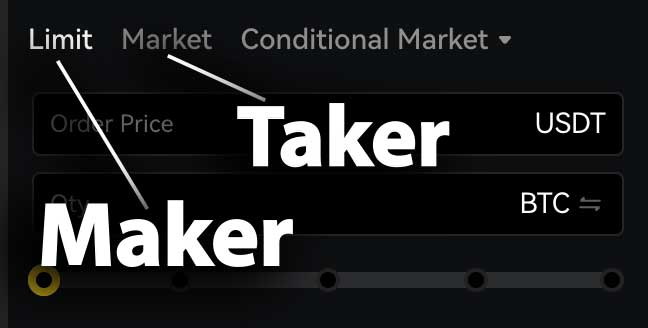
The difference in the fees comes from the type of order that is executed. A limit-order is an order that is placed in the order book and will only be executed when the price hits the limit price. Therefore, the trader adds liquidity to the order book and is calculated as a maker fee.
A taker fee is applied when the trader is executing his/her order with a market order. A market order is an order that will be executed directly for the best available market price and therefore takes liquidity out of the order book. For a market order, the taker fees are calculated.
If you’d signed up with our affiliate link, the maker and taker fees are slightly different:
Maker Fees: 0.019%
Taker Fees: 0.0475%
This might not seem that much, but on a trading volume of 10 million, that would be around $250. Long-term, this can be an extra way to optimize trading strategies for their profitability.
Why this matters for traders
Fees are a big expense for traders, and ideally, as a trader, you want to optimize it. Some trading strategies make or break depending on the fees.
You can imagine that, for example, for scalpers, who rely on very small price changes, maybe even a price change of 1% or even 0.5%, the taker fee pretty quickly takes 5%-10% of their profits. That’s a large expenditure and one that traders have to calculate before executing their trading strategy.
For swing traders, fees matter less because they target larger price movements. Since their profit margins are bigger, the fee becomes a smaller percentage of the total profit.
The Common Mistake: Using Market Orders
Most traders use market orders because the speed, it executes immediately. This means traders often see a setup on the chart, quickly open their exchange, and place a market order to enter the trade immediately. However, taking a bit more time to place a limit order can often save money, not only through better entry prices but also through lower fees on many exchanges. The only downside is opportunity costs.
Opportunity cost
So when should you use a market order? Well, if you’re a breakout trader, which means you’re waiting for the price to breakout out of a structure which often comes with high volatility, you might want to use a market order because you have no certainty that your limit order will be filled. So to be sure that you are in a position when the action happens, you’ll need to use a market order.
Limit order executed as a Market order
Here comes the tricky part, sometimes a trader wants to use a limit-order and puts the limit-price slightly below the current price. Therefore he might enter the position through a limit-order and only paying the maker-fees. However, if you put the price too close the to current Bitcoin price, and while your order goes into the order book, the price might have changed and became equal or lower then your limit-order price. In this situation the order will be executed as a market order.
So how can we prevent this?
What Is the Post-Only Limit Order Trick?
With the Post-only option, you can prevent this. The post-only option makes sure that your order will be placed in the order book as a limit-order, even when the price of Bitcoin has changed. It’s a very simple option that most exchanges offer but most traders are not aware of.
How to set Post-only step-by-step
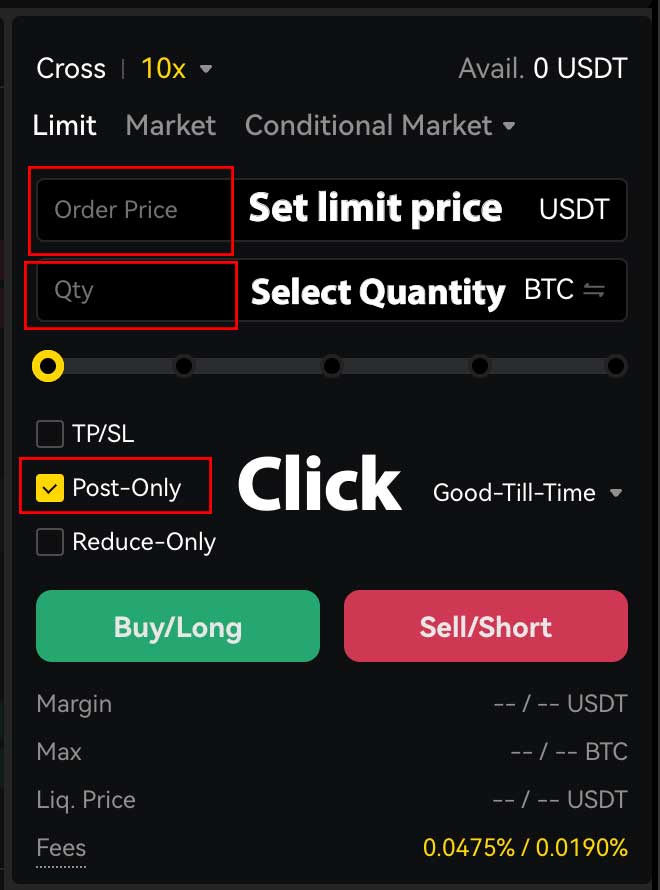
You use this by placing a limit-order, and set the limit-price right below the current price oof the asset you want to open a trade on. Then you select post-only, which makes sure that the order will be placed in the order book as a limit-order. Now you still have to wait for the limit-order to be filled, but your chances have significantly increased and you prevented your order from being executed as a market order. For a full tutorial on how to use Apex omni have a look at our Apex Omni tutorial.
How Much Money Can You Save? (Example Calculation)
The difference in fees between a maker and taker order is 0.03%. So let’s have a look at an example.
You want to open a long position on Bitcoin. You have 10.000 USDT in your account and apply a leverage of 20x. So the total order size is 200.000 USDT.
200.000 USDT / 100 x 0.02 = 40 USDT
200.000 USDT / 100 x 0.05 = 100 USDT
You’ve saved approximately 60 USDT on this trade.
When Should You NOT Use the Trick?
So should every trader right now just open limit-orders using the post-only trick? No, it’s definitely not for every trading strategy as some strategies require speed and direct execution. So if you’re a breakout trader, short-term volatility trader or really can’t afford to miss the position? Then it’s still better to use a market order for your trading.
Conclusion
Trading fees might look small on paper, but over many trades they become a major factor in long-term profitability. Apex Omni already offers competitive maker and taker fees, especially if you join with a fee discount, but understanding how to execute your orders correctly can reduce your costs even more.
The Post-Only Limit Order trick is one of the easiest ways to avoid unnecessary taker fees. It allows you to enter positions with the speed of a market order without paying market-order prices. For frequent traders, scalpers, and high-leverage users, this can save thousands of dollars over time.
If you want to start using Apex Omni while paying 5% less on your fees, consider creating your account using our link.
FAQ
What is the difference between maker and taker fees on Apex Omni?
Maker fees (0.02%) apply when you add liquidity to the order book using a limit order.
Taker fees (0.05%) apply when you remove liquidity using a market order or when a limit order executes instantly at the current market price.
Does Post-Only really save money?
Yes. Post-Only ensures your limit order is never executed as a market order.
This prevents accidental taker fees and guarantees you always pay the lower maker fee.
Why do some limit orders still execute as market orders?
If your limit price is equal to or worse than the current market price at the moment the order hits the book, it instantly fills, making it a taker order.
Post-Only prevents this from happening.
When should I not use Post-Only?
Avoid Post-Only when:
- You trade breakouts
- You need instant execution
- You cannot risk missing the entry
In these cases, a market order is faster and safer.
Is Apex Omni cheaper than centralized exchanges?
Apex Omni’s fees are competitive with most CEX platforms, but the real benefit is that you keep custody of your funds. With the Post-Only method, fees become even lower than many centralized exchanges.
Does leverage increase the fees I pay?
Indirectly, yes.
Fees are calculated on position size, not your account balance.
So if you use 20x leverage, your fee is based on the leveraged order amount, not your initial capital.
Related Articles:
- Apex Omni Tutorial: Trade on Bybit’s Decentralized Exchange (Step-by-Step Guide)
- Apex Omni Vaults Explained
- Bybit $30,000 Deposit Bonus Explained