Apex Omni Order Types Explained
What are the order types on Apex Omni?
Apex Omni is one of the most popular decentralized trading platforms, backed by the team behind Bybit. If you’re new to the exchange, you might wonder which order types are available and whether they work the same as on centralized exchanges.
In this guide, we explain every order type on Apex Omni simply and practically, so you know exactly how to execute your trades in the best way possible.
Market Order
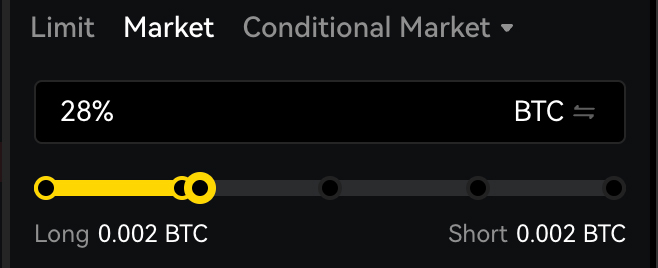
Let’s start with the easiest one, a market order. The name “market” says it already, as it is an order bought at the current market price. When you choose to long (buy) or short (sell) an asset with a market order, the exchange will fill the order directly with the available liquidity at the current price level; in that case, you are taking liquidity out of the order book. The benefit of a market order is that it’s executed directly, and you're in a position. A market order will have a higher fee than other order types, which is known as the taker fee.
Limit Order
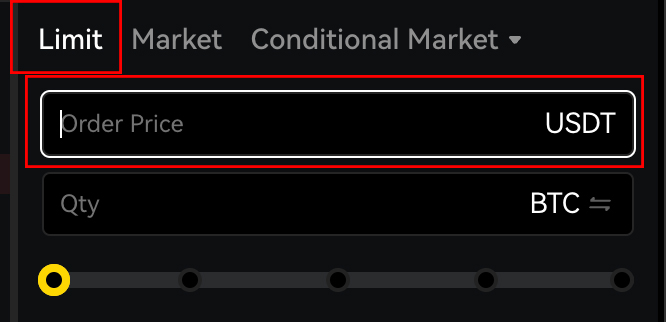
A limit order is an order that will be executed at the limit price. You can see in the order details that you have to provide a limit price. This means that the order will only be filled once the current price reaches your limit price. So there is an extra step involved compared to a market order. A limit order also takes more time to be executed as the price needs to meet the limit price, and there is no guarantee that will happen. With a limit order, you are providing liquidity to the order book, and therefore, there is a maker fee calculated which is lower than taker fees.
Conditional Orders
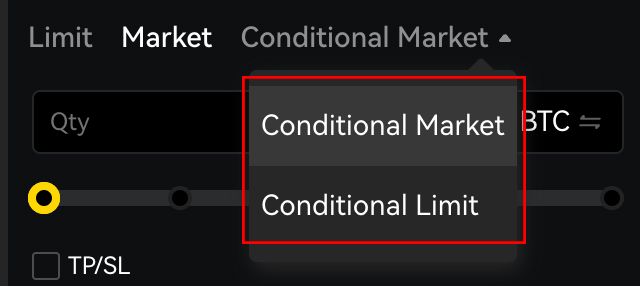
A conditional order is an order with one more step in the process, with a so-called “trigger price”. The trigger price is the price that needs to be met in order for this conditional order to be placed in the order book. There are 2 conditional orders, a conditional market order and a conditional limit order. So in both cases, the trigger price needs to be met first in order for the exchange to execute the order, either a market or a limit order.
So let’s say you want to open a conditional market order on Bitcoin, you like to buy Bitcoin when it breaks above a key level, let’s take $90,000, while bitcoin right now is trading at $87,000. You can then set the trigger price at $90,000 and then select the quantity and press long (buy). Once the price of Bitcoin reaches $90,000 your order will be executed and you will be in a long position.
With a conditional limit-order, after the trigger price is met, the limit order will be placed in the order book. In other exchanges they sometimes call these conditional orders a stop market or a stop limit order.
Take Profit & Stop Loss
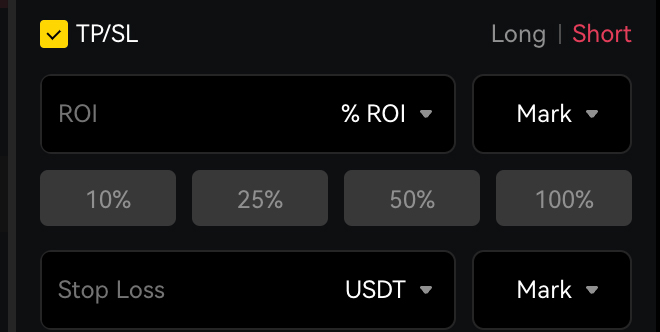
To even further automate your trading, and protect your capital, you can set a take profit or a stop loss. A stop loss is a protect mechanism for your trade to prevent further losses. For example, you are in a position but you’re only willing to lose 5% of your trade. Then you can set your stop loss at 5% and if the trade goes against you and loses 5%, the trade will automatically close. It will close with a market order. Take profit is the opposite, it is setting a predefined level where you want to take profit so if and when the price reaches that level, your trade will be closed and profits are taken using a limit order. You can set the take profit and stop loss in the order directly, or when the position is already opened, as well as adjust them when necessary.
Additional Options for Market Orders
The only advanced option with a market order is the Reduce Only. Reduce only means the order can only decrease your existing position, never increase it.
So if you’re already in a trade (long or short), a Reduce Only order will:
- Close part of your position, or
- Close your whole position,
- But it will never open a new trade or make your current one bigger.
If the order accidentally increases your position, the exchange simply won’t place it.
Additional Options for Limit Orders
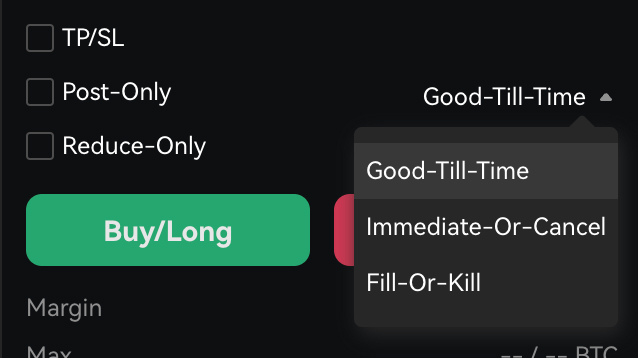
Most traders will probably never use these options but there are some additional options which you can select for your limit order and those are as follow:
Reduce Only
The order can only decrease existing positions.
Post-Only
This options ensures that your order will be placed as a limit order and not as a market order if the price suddenly changed during the time of creating the order.
Good-Till-Time (GTT)
Your limit order stays open until the time you choose.
Immediate-Or-Cancel (IOC)
Your order must fill immediately.
Anything that can’t be filled right away is canceled.
Fill-Or-Kill (FOK)
Your order must be 100% filled immediately.
If even a tiny part can’t fill, the entire order is canceled instantly.
Best Order Type For Beginners
The easiest order type for beginners is the market order, because it will open the order directly. But it definitely depends on the trading strategy as well. If you are trading a range, for example, and you want to short at the resistance, it makes more sense to set a limit order at the resistance, rather than waiting till the price is at the resistance and then opening a market order. Unless you need to watch for certain signals at the resistance in order to confirm a reversal. So it really depends on your personal trading strategy what works better, but in simple terms, a market order is easier, while a limit order is cheaper.
Common Mistakes To Avoid
The most common mistake traders make is that they try opening a limit order at the current price, which is executed as a market order because the price has changed since the time of detailing the order and placing the order. This problem is easily solved by using the post-only option. If you’d like to know more about this, please have a look at our Apex Omni Fees Explained article.
If you’d like to learn more about how to use Apex Omni or have a visual presentation on how to execute orders and open positions, have a look at the Apex Omni Tutorial below.
Join Apex Omni with our affiliate link and receive a 5% discount on your fees
FAQ
What are order types on Apex Omni?
Order types on Apex Omni are different ways to execute a trade, depending on whether you want instant execution, a specific price, or an automated trigger. The main order types are Market, Limit, and Conditional orders, with Take Profit and Stop Loss options for trade management.
What is a Market Order on Apex Omni?
A Market Order executes immediately at the current market price.
It is the fastest way to enter a position, but it uses the taker fee, which is higher than the maker fee.
When should I use a Market Order?
Use a Market Order when speed is more important than price, for example, when volatility is high or you want to enter a position immediately without waiting.
What is a Limit Order on Apex Omni?
A Limit Order lets you choose the exact price you want to buy or sell.
The order is only filled if the market reaches your chosen limit price. Limit orders use the maker fee, which is lower than the taker fee.
When should I use a Limit Order?
Use a Limit Order when you want a better price, are trading a range, or want your order to sit in the order book until your price is hit. It’s ideal for planned entries and cheaper fees.
What is GTT (Good-Till-Time)?
GTT allows your limit order to stay active until a specific time you choose.
If not filled by that time, the order expires automatically.
Related Articles:
- Apex Omni Fees Explained - Save Money Using The Post-Only Hack
- Apex Omni vs Aster. Which DEX Dominates the DeFi Trading War?
- Apex Omni Tutorial: Trade on Bybit’s Decentralized Exchange (Step-by-Step Guide)