AsterDEX Shield Mode Explained: Features, Fees & How It Works (2026)
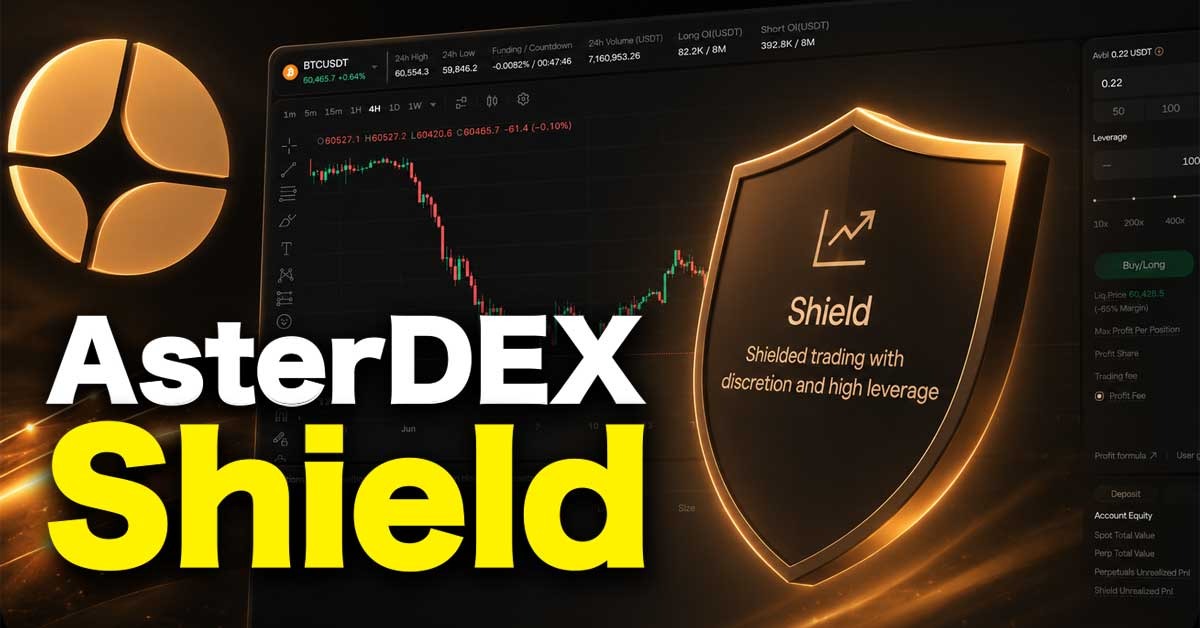
AsterDEX offers two futures trading interfaces: Perps and Shield Mode.
For traders seeking full privacy, using the Shield Mode can be a good option. It offers up to 1001x leverage, which can be a good fit or easily work against you. For most traders, the challenge is not finding profitable trades; it is keeping the trade alive long enough for the prediction to play out.
We have used both Aster Perps and Shield Mode repeatedly to execute futures trades. In this article, we explain all the core features and show you exactly how to execute a trade using the Shield Mode.
We also explain how liquidation works and show you the factors that can increase liquidation risks.
AsterDEX Shield Mode, in short: Shield Mode is AsterDEX's private futures trading interface. Instead of using a public order book, it routes trades through a liquidity pool, hiding your order details while supporting up to 1001x leverage and self-custody trading.
Need to learn more about how AsterDEX works first? See our AsterDEX Tutorial
If you want to try a different exchange with full on-chain visibility, you should consider Hyperliquid. Check out our Hyperliquid Tutorial or start trading on Hyperliquid.
What Makes AsterDEX Shield Mode Different
Using the Shield Mode differs from trading perpetual futures on AsterDEX or other decentralized exchanges because Shield Mode prioritizes trade privacy over transparency and is designed specifically for fast and high-volume futures trades, though it uses the same login or wallet connection interface.
After connecting our MetaMask wallet, switching from the Aster perps interface to the shield mode takes less than a second.
The first thing we noticed on the shield trading interface is the simplicity. Before placing an order, it was clear that trade execution was designed to be faster. All we had to do was select our margin size in the available options and set the leverage level to open a trading position. You can also type the amount you want to trade.
For all trading pairs, we could use a minimum of 10x leverage, which is surprising, as the exchange advertised 20x as the minimum for Shield Mode.
Trade execution is near-instant, and the exchange calculates the short and long liquidation prices once the margin and leverage are set. With this, you know how far the price can move against your position before it gets liquidated, and you can easily adjust your margin or leverage to lower the liquidation level.
Who is AsterDEX Shield Mode for
Shield Mode is ideal for:
- Bitcoin or Ethereum traders comfortable with aggressive leverage
- High-volume traders seeking complete privacy
- Traders seeking fast, no-KYC trading
Not ideal for:
- Beginners
- Experienced traders interested in low risk
- Traders interested in low fees
- Altcoin hunters due to the limited trading pairs
AsterDEX Perps vs Aster Shield Mode
One major difference between Aster Perp and the Shield Mode is capital requirement. On Perp, the minimum position size (margin + leverage) is $5.55 USDT, while Shield Mode requires at least 5 USDT margin (capital) to trade.
You can trade with as little as $0.2 USDT on AsterDEX Perps.
Aster perps and Aster shield mode are two different futures trading interfaces offered by AsterDEX, one of the best decentralized exchanges launched by YZI Lab (the ex-Binance Lab). While Aster Perps was launched along with AsterDEX spot trading, the exchange introduced Shield Mode in late 2025.
|
Features |
Aster Perps |
Aster Shield Mode |
|
Leverage |
1x - 200x |
10x - 1001x |
|
Trading pairs |
200+ |
20+ |
|
Trading fee structure |
Maker / Taker fee |
Profit fee / flat fee |
|
Trading fees |
0.015% / 0.045% |
10% / 0.03% |
|
Funding rate |
Every 8 hours |
Every 1 hour |
|
Margin Type |
Cross or isolated margin |
Isolated margin only |
|
RWA Trading |
Over 100 assets |
Only 9 assets |
|
Stop loss / take profit |
Available |
Not available |
|
Margin Size |
No minimum margin |
Minimum margin is 5 USDT |
|
Margin |
Uses any of the trading pairs |
Works with only USDT |
|
Order protection |
Hidden order |
Full on-chain privacy |
Difference Between AsterDEX Hidden Order And Shield Mode
With the hidden order, you can execute a perpetual futures trade with reasonable discretion. Your order stays hidden until it is executed. Still, it interacts with the exchange orderbook, so the trader who sells or buys into it can see the full details, and the trade is added to the order after execution.
In the Shield Mode, your order interacts with the protocol liquidity pool, so the details are fully protected and are not recorded on any order book.
To activate the AserDEX hidden order and start trading, see our AsterDEX Tutorial
How AsterDEX Shield Mode Actually Works
AsterDEX Shield Mode offers one of the fastest futures trading experiences in the space. Unlike regular futures trading on major DEXs, shielded trading is well-suited to high-volume traders and extreme-leverage users who prefer self-custody and like to conceal order details.
On the surface, many traders think the benefit is access to high leverage, but in reality, that just increases liquidation risk and overall trading cost. The Shield Mode was built to hide trades and order details. With it, you can execute large-volume orders without fear of anyone tracking or front-running your trades.
Using the Shield Mode can get complicated when you deposit assets other than USDT, because AsterDEX does not allow you to swap them for USDT. You can swap USDC and USDC.e to USDT.
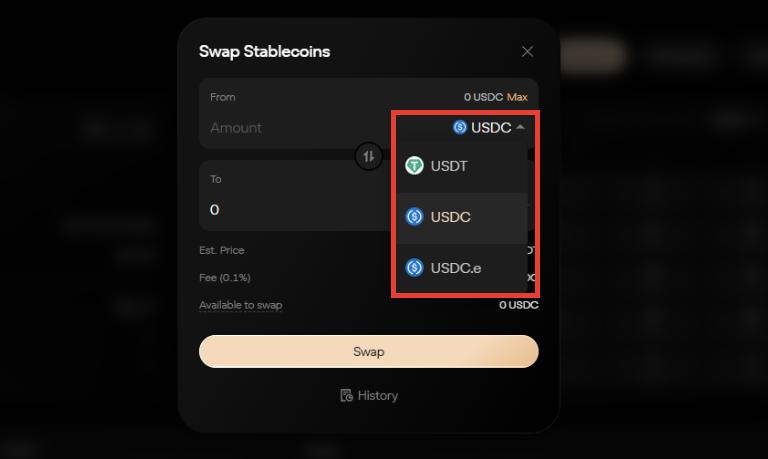
In the Shield Mode, you can only use USDT as margin. During our test, we deposited $BNB into AsterDEX. This works if you are using the Perp interface, as it supports multi-asset collateral. However, the Shield Mode does not, so we had to withdraw the $BNB and convert it into USDT before initiating another deposit.
Core Features of AsterDEX Shield Mode: Liquidity, Leverage, Fee, Explained
Liquidity Pool
Shield mode replaces order books with liquidity pools, so active and completed positions are not recorded on a publicly available leaderboard.
When you execute a futures trade in shield mode, you are trading against the protocol liquidity.
While this feature protects order details, it introduces slippage back into futures trading. Most exchanges that use orderbook operate a zero or low-slippage system, but with the Shield Mode, your trades attract slippage depending on liquidity depth and market conditions.
The exchange calculates the applicable slippage rate, and there is a minimum slippage percentage, meaning that when you interact with assets with low liquidity, you are likely to incur high slippage.
Note that the slippage rate is not clearly displayed in the order details before you open a trade, but we often find that the entry price is different from the market price at the time of trading. For instance, a $50 BTC-USDT order placed at the mark price of $59,908 was executed at $59,930.
Leverage
AsterDEX Shield Mode offers up to 1001x leverage, but you can only use that on Bitcoin (BTC) and Ethereum (ETH). For other trading pairs, the exchange offers 30x-100x leverage.
After using only 300x leverage and reviewing its liquidation mechanics, we found that only a few traders can realistically benefit from it. The liquidation price is so close to your entry price that a minor price fluctuation can wipe out your position within seconds.
For instance, opening a long position for Bitcoin at $59,512 with $100 and 300x leverage, the liquidation price is $59,314. With that, a 0.33% move against the entry price will liquidate the position.
The interface does not offer stop-loss or take-profit functions, making it unsuitable for new traders or anyone interested in capital preservation.
Also, increasing leverage in AsterDEX Shield Mode is not entirely beneficial to traders, as the exchange imposes a maximum profit level and forced liquidation. The exchange can automatically close your trade when the profit on your trade reaches the maximum threshold allowed or when your position is close to the liquidation price.
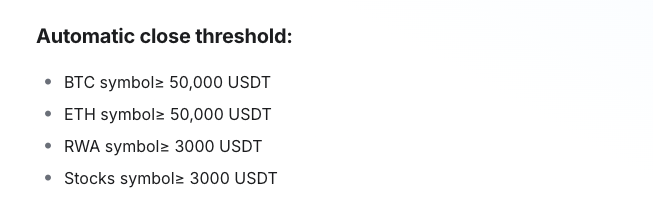
Quick Note: Liquidation price can change over time. In Shield Mode, funding rates are calculated every hour. When a funding fee is applied to your trade, it affects your available margin. Paying the funding fee reduces your margin and moves the liquidation price closer to your entry price, while receiving it increases your margin and pushes the liquidation price farther away from your entry price.
Fees
Another key difference between Aster Perps and Aster Shield Mode is the fee structure. On Perps, the regular maker or taker fee applies depending on whether you are placing a limit or market order. In Shield Mode, AsterDEX applies profit share or flat fees.
The flat fee is 0.03% of the value of your trading position, and it is charged when you open and close positions.
Alternatively, traders can activate the profit share mode. With that, AsterDEX removes a 10-15% profit share, depending on your trading volume. We tested it with a $100 USDT margin and 300x leverage, which gives a $3,000 position, and a 10% profit share applies.
The benefit of using the profit-share mode is that you only pay on the profit you make. When you trade at a loss, no trading fee is applied. For large-volume trades, this can be a tricky offer. In some instances, 10% of your profit may be higher than 0.03% flat fee.
Also, the exchange charges a funding fee that is calculated hourly. The fee is not static; instead, it is calculated based on conditions such as open interest and the asset. Check the "funding rate explained" article to see how the funding fee is calculated across different exchanges.
How to Use the AsterDEX Shield Mode for Futures Trading
Step 1: Connect Wallet
- Visit the official AsterDEX website
- On the interface, click on ‘Connect’
- On the next page, select the preferred wallet. This automatically opens your wallet app or extension.
- Now, sign the wallet connection and enable trading in your wallet.
To confirm that your wallet is connected, check the top right corner for your wallet address.
Step 2: Deposit funds
- On the main interface, click on ‘Deposit’
- Select ‘perpetual account’ for easy futures trading
- Select the preferred blockchain and asset to deposit.
- Enter the deposit amount
- Click deposit
- Now, confirm the deposit transaction in your wallet
To make trading easy, deposit USDT via BNB Chain. That takes less than 3 minutes, but other blockchains may take up to 10 minutes.
Step 3: Open your first futures trade in Shield Mode
- On the main interface, click on ‘Trade’
- Then, click on ‘Shield’. This activates the Shield Mode trading interface
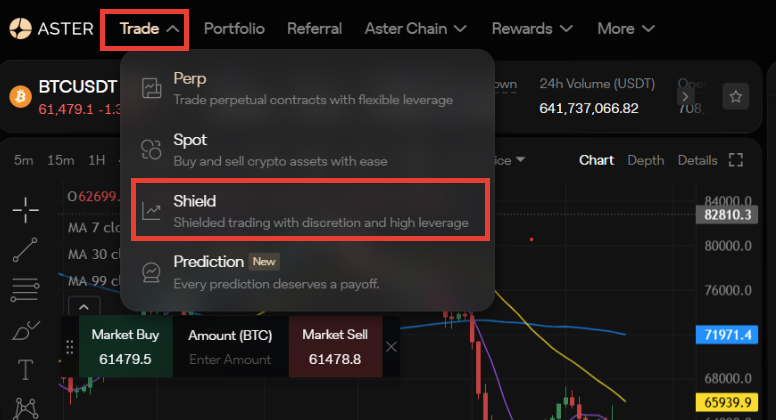
- Select or enter your margin. Minimum margin is 5 USDT
- Set leverage
- Review the order details (liquidation price, profit share, and flat fee)
- Click on ‘Buy/Long or Sell/Short’
You can view your trade in the ‘positions’ section under the chart.
Risks of Using Shield Mode
- Leverage level: Using extreme leverage increases liquidation risk. If you must use it, combine it with good risk control.
- Unfair profit-and-loss system: The exchange sets profit thresholds and forces liquidation when your margin falls too low. This means you can be completely liquidated but cannot claim the maximum possible profit when your prediction is right.
- Hourly Funding rate: The funding fee is charged hourly; it can accumulate quickly when your trade is extended over hours, and can speed up liquidation if you are paying it.
Final Thought: Is Shield Mode Actually Private?
AsterDEX Shield Mode offers enhanced privacy, but it does not completely erase your on-chain trading history. Therefore, while your wallet activity is not visible as it is on other transparency-focused exchanges like Hyperliquid or GMX, anyone can still trace your trades directly on the blockchain using tools like Etherscan or BSCscan.
Testing the feature, we found that the biggest advantage is not capital efficiency; it is the ability to trade without exposing order details.
For active traders or whales, Shield Mode protects your trades from MEV attacks because it is not visible on the orderbook, significantly lowers the impact of large-volume trades on asset prices, and reduces volatility.
See the differences between AsterDEX and Hyperliquid in our previous article.
Frequently Asked Questions
What is Aster DEX?
Aster DEX is a Binance-backed decentralized exchange launched in 2025. It allows traders to complete spot and futures trades at low trading fees while relying on an on-chain orderbook and liquidity pools.
What is AsterDEX Futures Trading Fees?
On the regular perpetual trading interface, AsterDEX applies a 0.015% maker fee and a 0.045% taker fee, which are among the lowest in the space. Spot, RWA, and Shield Mode trading fees differ. You should check the AsterDEX doc for full trading fees.
Does AsterDEX Support Spot Trading?
AsterDEX has a simple spot trading interface where traders can buy and hold assets, but it offers a limited number of trading pairs.
Is Shield Mode Better than Hidden Order?
It depends on who is using it. For traders seeking high on-chain privacy, Shield Mode is the best option. But if you are only trying to protect your order details from MEV attacks, using the Hidden Order features is a fit.